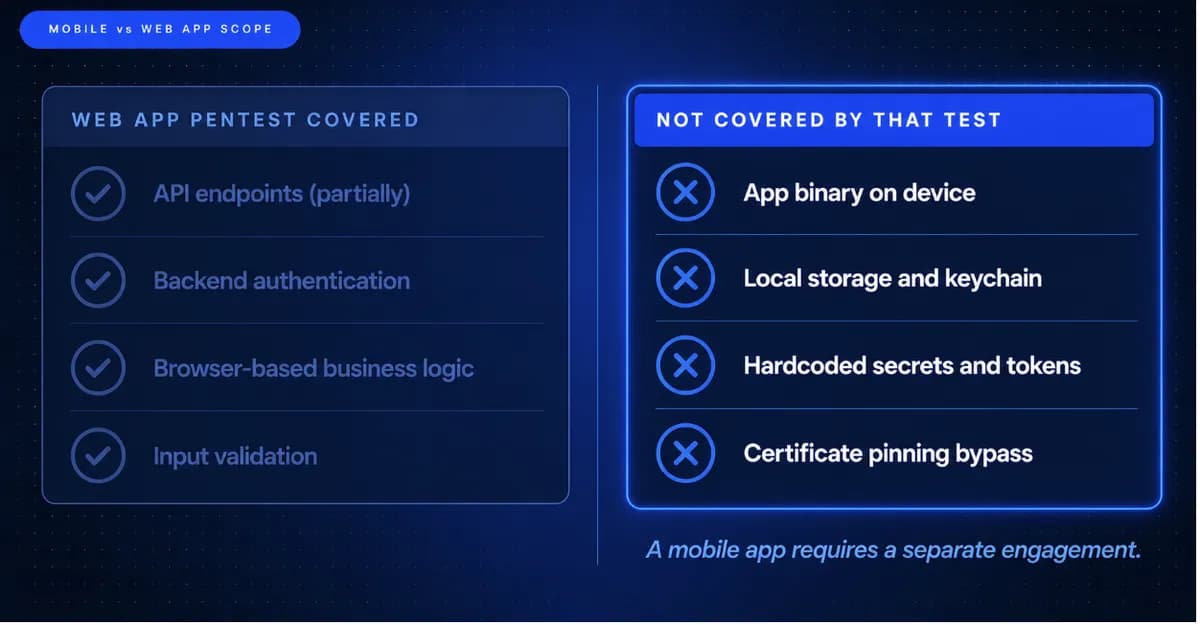
Most security teams assume their mobile app was covered in the web app penetration test. It was not. The API calls, yes. The backend logic, partially. But the binary sitting on your users' devices, the local storage, the hardcoded secrets, the certificate pinning that a tester bypasses in seconds, the exported Android components, the iOS keychain misuse, none of that is in a web app pentest scope.
Mobile penetration testing is a different platform with a different attack surface and a completely different testing methodology. The client layer covers the compiled app and how it stores data, manages sessions, and resists reverse engineering. The network layer covers transport security, certificate pinning, and the structure of API traffic. The server layer covers the authentication and authorisation logic behind every endpoint the app touches.
Understanding what each layer tests, and how iOS and Android differ at each layer, is the starting point for every ANZ team scoping their first mobile security test.
The Three Layers Every Mobile Test Must Cover
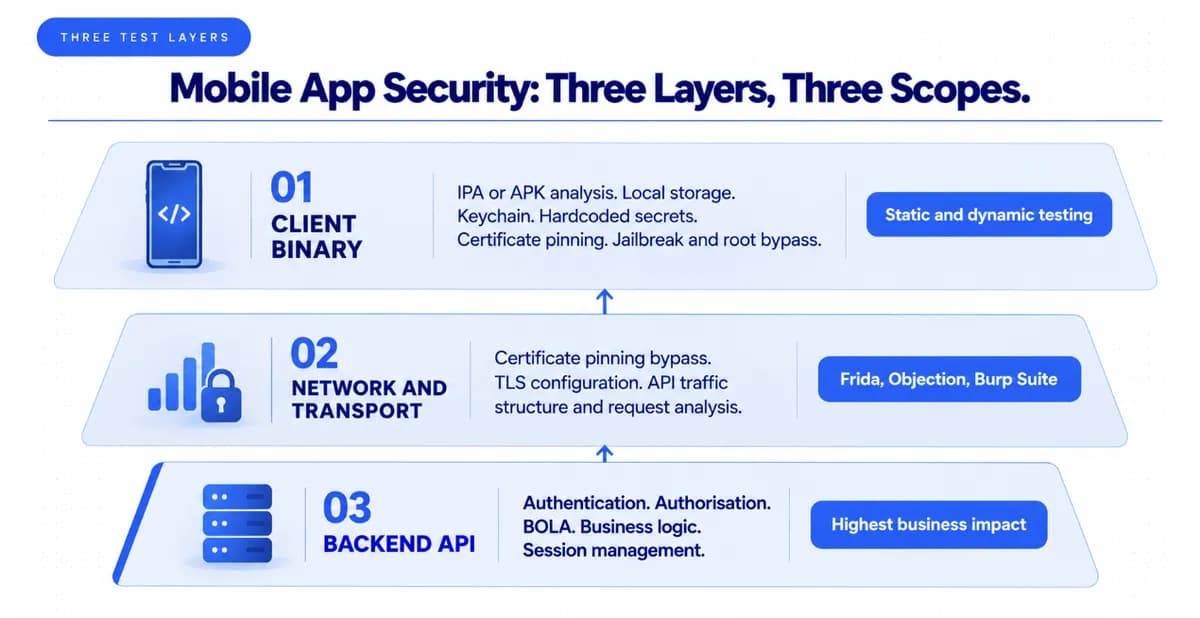
The client binary layer is where mobile testing diverges most sharply from web application testing. The tester analyses the compiled application binary: the IPA file for iOS and the APK for Android. This layer covers sensitive data in the keychain or keystore, databases, caches, logs, and backups on the device. Login, biometric, and MFA bypass, session handling and token weaknesses. Weak or misused cryptography, hardcoded keys, and insecure random number generation.
Dynamic iOS testing often requires a jailbroken test device or a special testing build. Testers use runtime instrumentation to bypass jailbreak detection, analyse network communication, manipulate app logic, and determine whether anti-tamper, anti-debugging, and certificate pinning protections are meaningful or cosmetic.
The network and transport layer tests certificate pinning implementation, TLS configuration, and the API traffic the app generates. Certificate pinning is a frequently misunderstood control. Skilled testers bypass certificate pinning routinely using Frida hooks, Objection, SSL Kill Switch on iOS, and Magisk modules on Android. Pinning is a useful control that raises the cost of attack, but it is not a substitute for secure API design and proper backend authorisation. The question to ask is: if pinning is bypassed, and in a penetration test it will be, what does the API allow?
The backend API layer is where the highest-business-impact findings typically live. The API endpoints a mobile app calls are often the same endpoints accessible from any authenticated HTTP client. Broken object-level authorisation, broken function-level authorisation, and missing authentication on specific endpoints produce findings that affect every user of the app, not just a single device. For what thorough API testing at this layer examines, the guide to API penetration testing and securing the backbone of modern applications covers the methodology that separates surface-level API scanning from the authorisation testing that matters.
iOS vs Android: What Each Platform Requires Separately
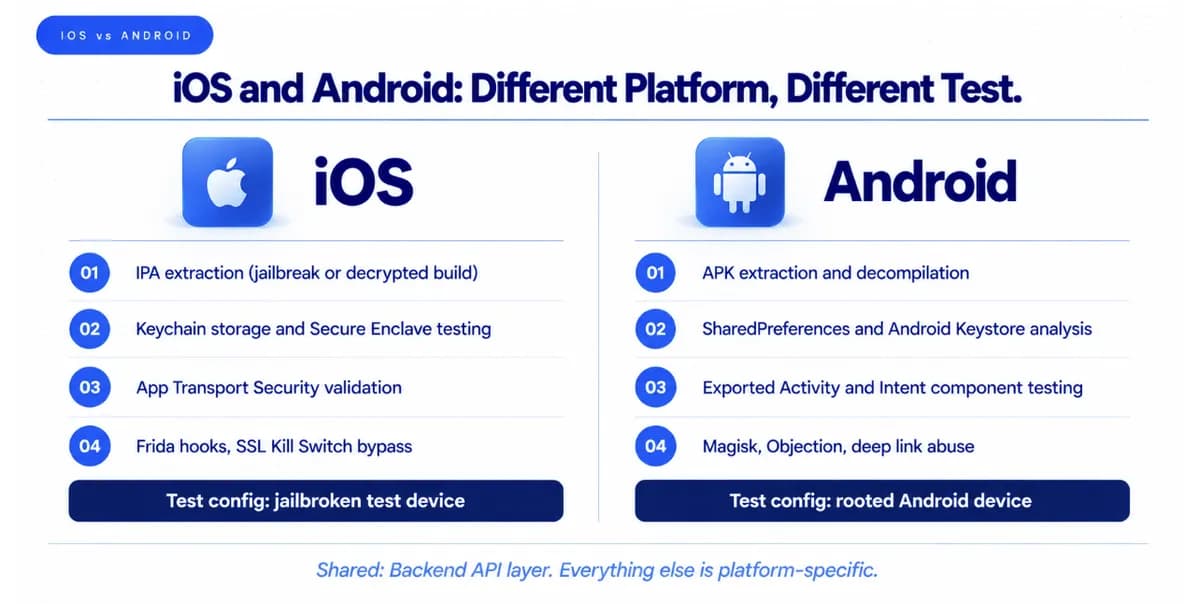
iOS and Android must be tested separately. The platforms share a backend API layer, but the client binary, the local storage mechanisms, the inter-process communication model, and the platform security controls are entirely different.
On iOS, the Secure Enclave, keychain storage model, and App Transport Security settings are platform-specific controls that require iOS-specific testing. IPA extraction for static analysis requires either a jailbroken device or cooperation from the development team to produce a decrypted build. Testing biometric authentication bypass on iOS requires different techniques than on Android.
On Android, APK extraction is generally more accessible. Exported Activity and Intent components, the SharedPreferences storage model, and the Android Keystore usage are Android-specific attack surfaces. Root detection bypass uses Magisk-based approaches that differ from jailbreak bypass on iOS. Deep link handling, content providers with misconfigured access controls, and broadcast receiver abuse are Android-specific findings.
OWASP MASVS defines the security requirements an app should satisfy. OWASP MASTG provides the testing methodology and detailed test guidance across storage, cryptography, authentication, network communication, platform interaction, code quality, and resilience.
Your Last Pentest Is Already Out of Date
Every week you ship without continuous testing is a week a vulnerability goes unseen. See what Capture The Bug finds in your first engagement.
OWASP MASVS Levels: Which Applies to Your ANZ App
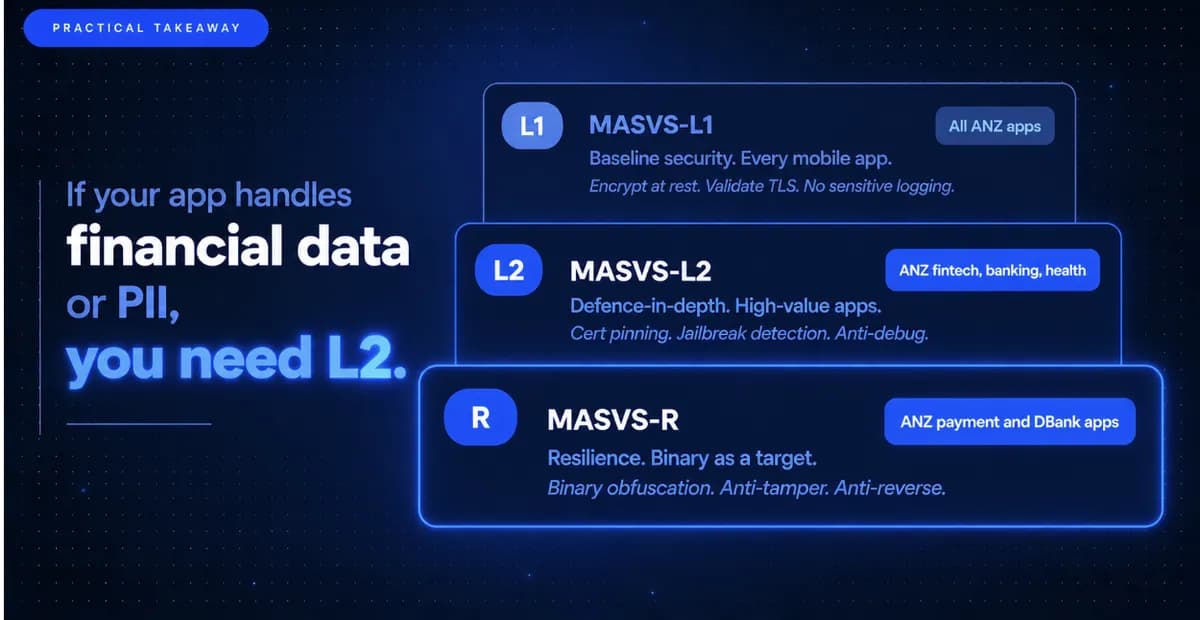
MASVS defines two verification levels plus a resilience category. MASVS-L1 covers baseline security for all mobile apps. MASVS-L2 adds defence-in-depth controls for apps handling high-value transactions or sensitive personal data. L2 adds requirements for certificate pinning, root and jailbreak detection, and anti-debugging protections.
For ANZ fintech, banking, and health apps, L2 is the expected testing standard. These apps handle financial data, health records, or personal information covered by the Privacy Act 1988 in Australia or the Privacy Act 2020 in New Zealand. A mobile app penetration test that only covers L1 does not test the controls that regulators and enterprise buyers in these sectors expect to see validated.
The MASVS-R category covers binary protection, code obfuscation, anti-tampering, root and jailbreak detection, and debugger detection. R requirements apply to apps where the binary itself is a target: payment apps, apps with proprietary algorithms, or apps where client-side logic bypass would cause direct financial harm. For ANZ payment apps and digital banking apps, MASVS-R testing is appropriate where the app contains client-side payment logic or proprietary fraud detection algorithms.
For how the mobile penetration test findings connect to the remediation and re-testing evidence that APRA supervisors and SOC 2 auditors check, the guide to what happens after a penetration test covers the re-testing cycle that confirms a mobile finding is genuinely closed, not just addressed in the next app store build.
Book a scoping consultation to confirm the right MASVS level, iOS and Android test configuration, and backend API scope for your ANZ mobile application.
Plan Your Annual Pentesting Strategy the Right Way
Learn how modern SaaS companies structure pentesting across the year to reduce risk, stay compliant, and avoid last-minute panic before audits.

Frequently Asked Questions
How is mobile app penetration testing different from web app penetration testing?
A web application penetration test examines what a user can do through a browser: authentication, access controls, API authorisation, and business logic. A mobile penetration test examines three additional layers: the client binary (the compiled app), the local storage on the device (keychain, keystore, databases, caches), and the platform-specific controls (certificate pinning, biometric bypass, exported Android components, iOS inter-process communication). The network and backend API layers overlap between mobile and web testing, but the client-side component requires entirely different tools and techniques and must be scoped separately.
Do iOS and Android need to be tested separately?
Yes. The platforms share a backend API layer but the client binary, local storage mechanisms, inter-process communication model, and platform security controls are entirely different. iOS testing requires jailbroken devices or decrypted test builds, platform-specific IPA analysis, iOS keychain testing, and App Transport Security validation. Android testing uses APK extraction, Magisk-based root bypass, exported Activity and Intent component testing, and SharedPreferences storage analysis. A tester using iOS methodology on Android or vice versa will miss platform-specific findings.
What is OWASP MASVS and how does it apply to ANZ mobile app testing?
OWASP MASVS (Mobile Application Security Verification Standard) defines the security requirements a mobile app should satisfy, organised into L1 (baseline security for all apps), L2 (defence-in-depth for financial, health, and government apps), and MASVS-R (resilience against reverse engineering and binary tampering). For ANZ fintech, banking, and health apps, L2 is the expected testing standard because these apps handle data covered by Australian and New Zealand privacy legislation. MASVS-R applies to apps where client-side logic bypass would cause direct financial harm.
Does certificate pinning protect a mobile app from penetration testing?
Certificate pinning makes traffic interception harder but does not prevent it. Skilled testers bypass certificate pinning routinely using Frida hooks, Objection framework, SSL Kill Switch on iOS, and Magisk modules on Android. Certificate pinning is a useful control that raises the cost of attack. It is not a substitute for secure API design and proper backend authorisation. The critical question a mobile penetration test answers is: if pinning is bypassed (and in a test it will be), what does the underlying API allow? A well-designed backend remains secure even after pinning is bypassed.
What does a mobile penetration test find that an automated scanner does not?
Automated mobile scanners check for known patterns: hardcoded strings, insecure manifest settings, and known vulnerable library versions. They do not test exploitability, cannot bypass certificate pinning, cannot test biometric authentication bypass, cannot analyse runtime behaviour under instrumentation, and cannot test the business logic of backend API endpoints the app calls. A human tester using Frida, Objection, and Burp Suite tests how the app actually behaves under attack conditions, producing findings like authentication bypass, insecure direct object reference in API calls, and broken session management that automated tools cannot generate.