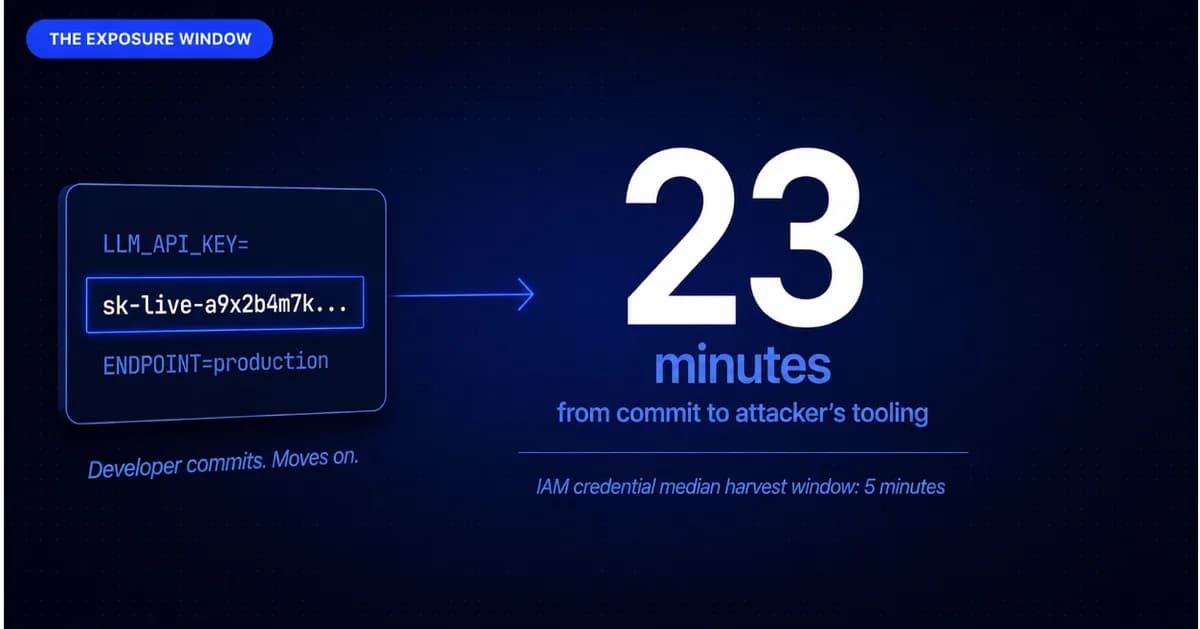
The developer was not being careless. They were moving fast. A new LLM integration needed an API key. The key went into the configuration file. The configuration file went into the repository. The repository was private. The developer moved on to the next feature.
Twenty-three minutes later, the key was in an attacker's tooling.
This is not a hypothetical. It is the pattern behind the majority of AI-related credential incidents that have emerged alongside the rapid expansion of LLM integrations, AI agent deployments, and vibe-coded features in 2026. The configuration files that connect AI tools to production infrastructure are exactly the credential surfaces that most secret scanning programmes were not designed to cover, because they did not exist at scale two years ago.
More than 25 million new hardcoded secrets appeared in public GitHub repositories in 2025. Over 60% of valid secrets identified in 2022 remain valid today. IAM credentials have a median harvest window of five minutes after exposure. The gap between "committed to a repository" and "in an attacker's hands" is smaller than a pull request review.
What follows traces that incident against the tools that would have interrupted it at each stage.
Minute Zero: The Developer Commits
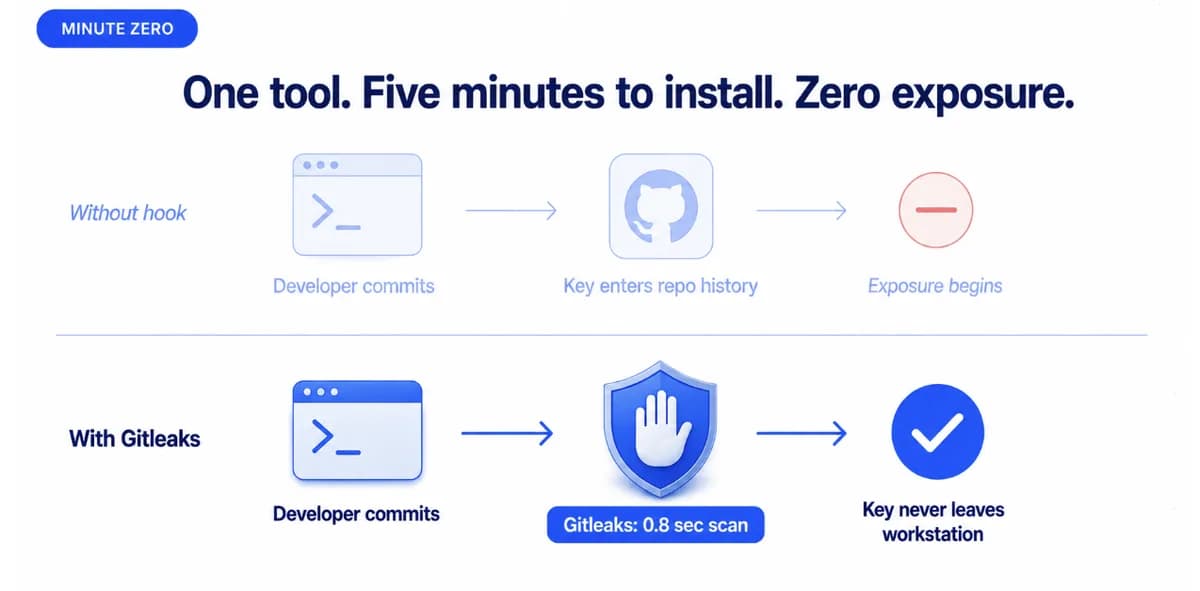
The configuration file contains a live API key for a production LLM service with access to customer data endpoints. The developer runs a commit and pushes directly to the main branch.
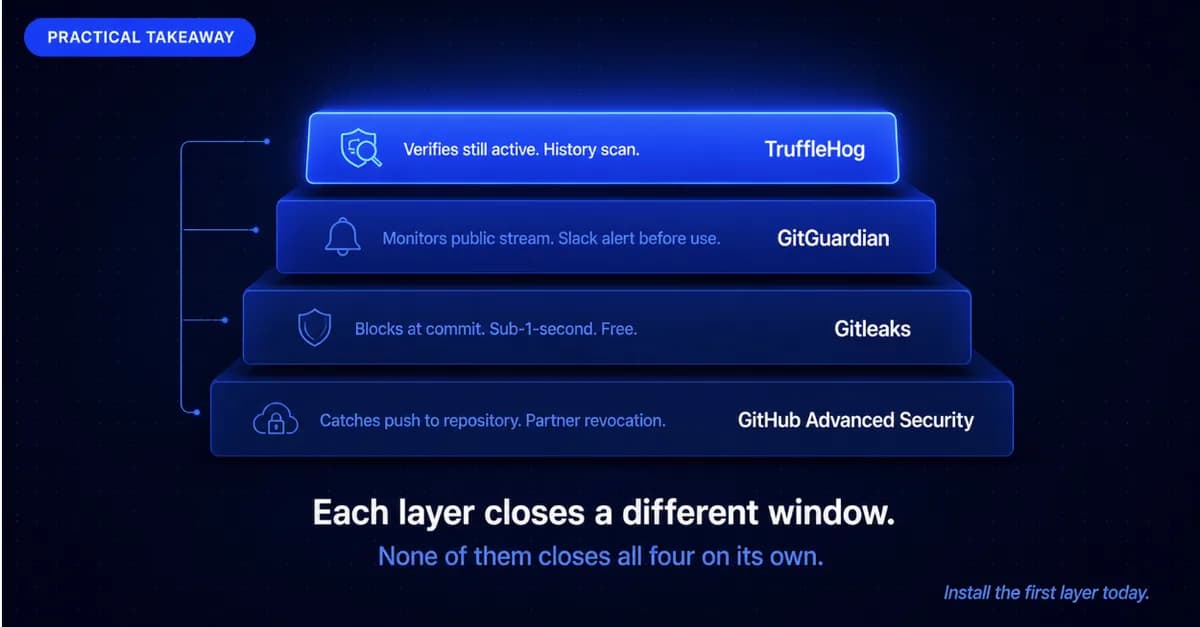
A Gitleaks pre-commit hook catches this before it leaves the workstation. Gitleaks completes a diff scan in under one second and blocks the push, printing the matched secret type and line number to the terminal. The developer rotates the key, moves the value to an environment variable, and commits again. Incident over. Total exposure time: zero minutes.
But Gitleaks was not installed on this developer's workstation. They joined the team two months ago and the onboarding checklist was aspirational.
Minute Three: The Key Reaches GitHub
The commit arrives at the repository. GitHub Advanced Security native scanning detects the key pattern within seconds using its partner detection library, which covers the LLM service provider's key format. Push protection on private repositories, available through GitHub Advanced Security, would have blocked the push before this moment. Without push protection enabled, the detection fires as an alert rather than a block, and the key is now in the repository history.
The partner program integration triggers an automated revocation request to the LLM service provider, which processes the invalidation within a few minutes if the provider is part of the programme. Not all LLM service providers are enrolled.
Minute Twenty-Three: The External Scrape
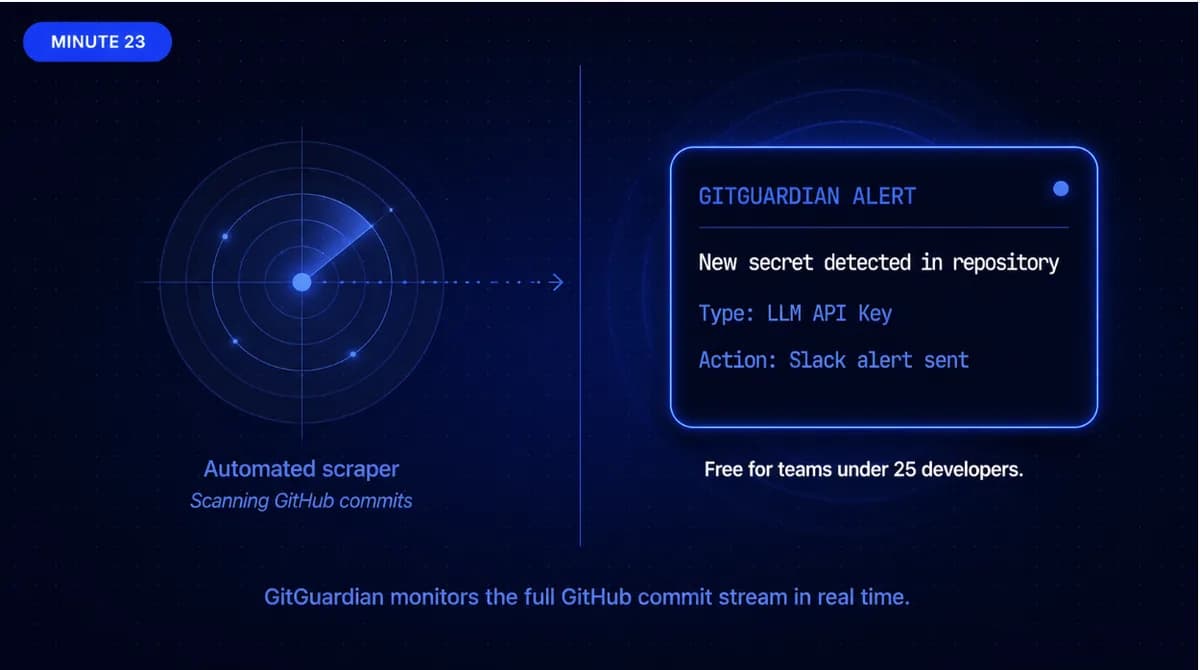
Automated tools crawling GitHub for exposed credentials find the key. This is not a targeted attack. It is automated infrastructure running continuously against the public and, where accessible, private GitHub surface. Five minutes is the median time from credential exposure to first harvesting attempt for live IAM-class credentials, according to available incident data.
A GitGuardian deployment with public monitoring would have detected the exposure at this point and notified the security team before the automated harvesting began, because GitGuardian's monitoring runs against the full GitHub commit stream in real time. The alert would have arrived in the security team's Slack channel with the affected credential type, the repository, and the commit hash. If revocation had not been completed through the GitHub partner programme, this would have been the second chance to invalidate the key before active use.
For SaaS organisations running continuous testing programmes, the guide to how attackers discover unpatched assets across cloud and SaaS environments covers the automated scanning infrastructure that operates against exposed repositories. Secret scanning is the defensive mirror of that attacker tooling.
Your Last Pentest Is Already Out of Date
Every week you ship without continuous testing is a week a vulnerability goes unseen. See what Capture The Bug finds in your first engagement.
Three Months Later: The Slow Burn
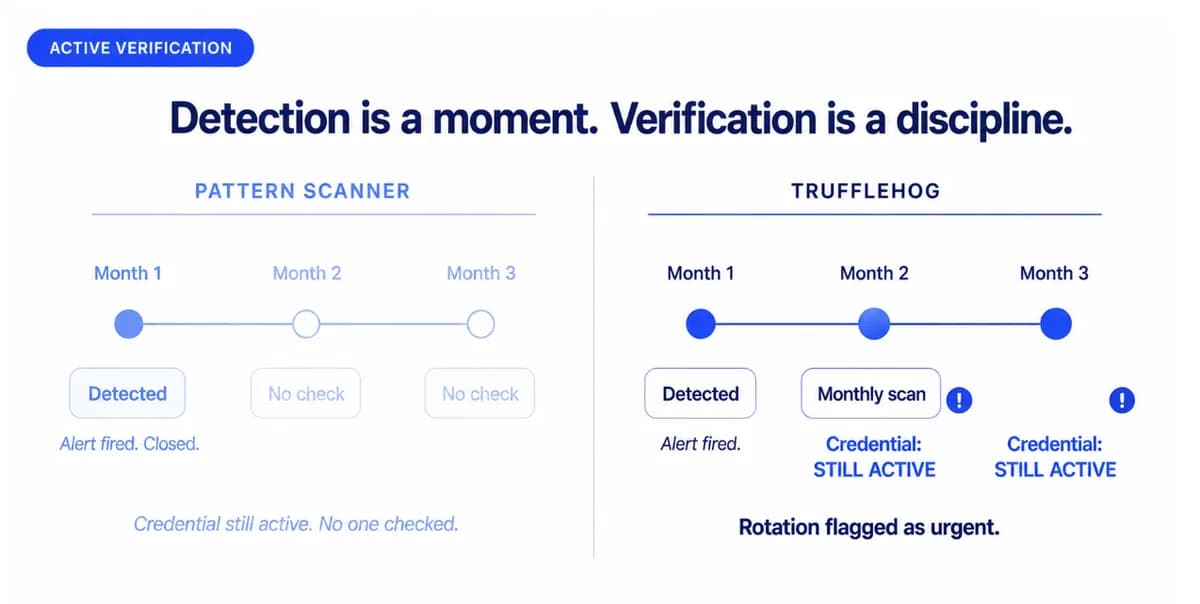
The key was never rotated. The GitHub partner revocation did not cover this LLM provider. GitGuardian was not deployed. The Advanced Security alert was reviewed, noted, and closed in the wrong queue.
The attacker has been using the key for three months. The usage appeared in billing logs nobody reviewed, because nobody was looking for requests from an external IP address range.
TruffleHog with active credential verification would have flagged the key as still-valid at any point a git history scan ran. Unlike pattern-matching scanners that flag a key once at detection, TruffleHog tests whether the credential still works against its provider. A monthly scan shows "key still active" rather than "key detected, no action." The guide to what happens after a penetration test applies directly: a credential marked as detected without verified invalidation is an assumption, not a confirmed close.
Six Months Later: The Discovery
The team discovers the breach during a quarterly security review. The exposure window was six months. The key accessed customer data endpoints an estimated 340 times from external IP addresses. Legal and regulatory notification obligations now apply.
The tools that would have interrupted this at each stage:
- At commit time: Gitleaks or TruffleHog pre-commit hook. Cost: zero. Condition: installed on every workstation including recent joiners.
- At repository ingestion: GitHub Advanced Security with push protection on private repos. Condition: Advanced Security licence active.
- At first external exposure: GitGuardian public monitoring with Slack integration. Cost: free under 25 developers. Condition: deployed with alerts routed to an active channel.
- During the six-month window: TruffleHog or GitGuardian periodic history scan with active verification. Condition: scheduled to run.
The incident was not a zero-day. It was a configuration file, an automated scraper, and a six-month gap in credential rotation discipline. Every tool on this list was capable of interrupting it. None were in position to do so.
What Being "In Position" Looks Like
For teams with LLM integrations, AI agent deployments, or any configuration surface connecting to production credentials, the exposure vector above is now a standard attack surface, not an edge case.
Start with a Gitleaks pre-commit hook on every developer workstation, including new joiners. Add GitHub Advanced Security if your team is on GitHub. Add GitGuardian or scheduled TruffleHog history scanning when those two layers are running reliably. Each layer closes a different window in the six-month exposure the incident above describes.
For teams building or maintaining continuous security programmes, the guide to continuous penetration testing for SOC 2 and ISO 27001 compliance covers how credential monitoring fits into the broader compliance evidence chain.
The question is not which tool is best. The question is which stage of the exposure window your current programme covers and which stage it does not.
Book a security consultation with Capture The Bug to map your current credential exposure across LLM integrations, CI/CD environments, and repository surfaces against what your team has in place.
Plan Your Annual Pentesting Strategy the Right Way
Learn how modern SaaS companies structure pentesting across the year to reduce risk, stay compliant, and avoid last-minute panic before audits.
FAQ
What secret scanning tool would catch a hardcoded LLM API key before it reaches GitHub?
A Gitleaks or TruffleHog pre-commit hook installed on the developer's workstation catches a hardcoded key before it leaves the machine. Gitleaks completes a diff scan in under one second and blocks the push. The condition is that the hook must be installed on every developer workstation, including team members who joined recently. This is the zero-cost, highest-leverage intervention point in the credential exposure lifecycle.
How quickly do attackers find exposed credentials in 2026?
The median harvest time for IAM-class credentials after public repository exposure is approximately five minutes. Automated tools run continuously against public GitHub repositories and newly pushed commits. This means the window between a credential reaching a repository and being in an attacker's tooling is smaller than the time it takes most security teams to triage an alert.
What is push protection and which tools offer it?
Push protection blocks commits containing known-pattern secrets before they leave the developer's workstation or before they are accepted by the repository. GitHub Advanced Security offers push protection for private repositories as part of its licence. Gitleaks pre-commit hooks provide push-protection-equivalent behaviour at the workstation level for any token format you configure. Aikido Security also offers pre-commit blocking with live credential validation.
Can secret scanning tools detect API keys in LLM configuration files and AI agent setups?
Yes, but coverage varies by tool. TruffleHog's 800-plus verifier library covers most major LLM service providers' key formats. GitHub Advanced Security covers providers enrolled in its partner programme. Tools like GitGuardian extend coverage to configuration surfaces beyond source code, including container images, CI/CD logs, and files that may not pass through a standard git commit flow. LLM configuration files, MCP configuration files connecting AI agents to production services, and environment variable files are surfaces that specialised tools cover more comprehensively than pattern-only scanners.
Is it worth paying for a managed secret scanning platform if my team is already using GitHub Secret Scanning?
For teams below 25 developers with a single GitHub organisation and no multi-surface exposure, GitHub Secret Scanning combined with a free pre-commit tool covers the primary attack surface. For teams with CI/CD log exposure, collaboration tool surfaces (Slack, Jira), multiple code hosts, or compliance requirements that need incident timelines and audit trails, the gap between GitHub Secret Scanning and a managed platform like GitGuardian is the gap between pattern detection and incident management. GitGuardian's free tier covers 25 developers and is the natural next step before a commercial licence.